

The Marketer's Guide to Context Windows
In this weeks newsletter, I will explain why your AI gets worse the longer you work with it, and the invisible limit no AI tool warns you about.
Every Wednesday, one essay on what's actually working in Marketing with AI - tools, workflows, and mindset shifts you can apply immediately.

(Use Discount Code SUBSTACKCONTEXT to get 10% off Claude for Marketers Masterclass this week only. Substack readers only.)
Lets’s get into this weeks newsletter…this is an important one for marketers to grasp as it changes how you work with AI forever.
The Marketer’s Guide to Context Windows

It’s Tuesday afternoon. You open Claude or ChatGPT, connect your brand guidelines, your audience notes and a rough brief, and start building a campaign.
The first few replies are excellent.
On brand, sharp, exactly what you wanted.
Then, somewhere around the fifteenth message, the responses start to drift. The tone flattens. It suggests an angle you explicitly ruled out earlier. It contradicts a decision you made twenty minutes ago.
By the time you notice, you’re arguing with it, re-pasting the brief, wondering why it suddenly “got dumber.”
So what’s going on?
You’ve likely been blaming the model. But the real problem is the context window. And the tools will never teach you or tell you.
Almost every marketer or marketing team I train or teach has had this exact experience, and almost none of them can name what caused it.
It isn’t a glitch, a bad prompt, or a lazy model.
It’s a hard limit sitting behind every AI conversation you have, one that quietly shapes the quality of everything the AI gives you.
And it’s the least understood, least talked-about idea in AI marketing, precisely because it isn’t a shiny new feature. It’s the invisible wiring behind every chat you have, and it shapes your results whether you notice it or not.
So this week, let’s fix that.
By the end of this you’ll understand what a context window is, why it silently degrades your work, and exactly how to manage one you can’t even see.
What a context window actually is
Let’s start with a picture.
Imagine a school whiteboard.
At the top you write your brand brief. Below it, your campaign goals. Then your questions, and the AI’s answers, filling the board top to bottom as the conversation grows.
Now the board is full.
To write anything new at the bottom, something has to be rubbed off the top.
So the oldest content goes first: your brand brief, your original instructions, the constraints you set at the very start. The AI keeps writing. But the content at the top is gone, wiped to make room.
No warning. No alarm. It simply can no longer see what it’s forgotten.
The context window is that whiteboard. It’s the total amount of information an AI can hold in its working memory at any one moment.
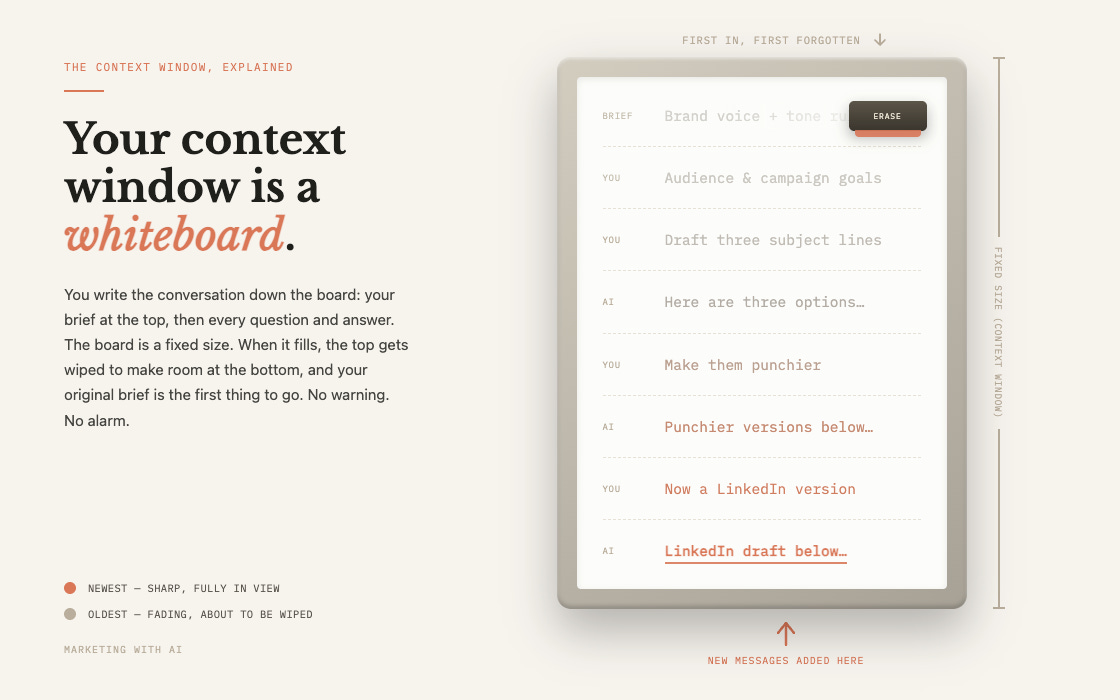
Everything inside the window, the AI can see and use. Everything that’s fallen off the edge simply doesn’t exist to it anymore.
Another way to picture it: every conversation is written on a single sheet of A4.
Every word you type, every reply it gives, every document you attach, all of it has to fit on that one sheet. When the sheet is full, the top lines get crossed off so the bottom ones can be written.
One thing to be clear on.
This is working memory for a single conversation, not long-term memory. It’s what the AI can hold in its head during this one conversation, not what it remembers about you forever.
Memory features are a separate thing, and we’ll come to them.
Tokens: The Currency You’re Spending
The whiteboard capacity we referenced earlier isn’t measured in words.
It’s measured in tokens, and tokens are the currency of everything you do with AI.
A token is a chunk of text, usually a piece of a word rather than a whole one. The rough conversions worth memorising:
• 1 token is about three-quarters of a word
• 1,000 tokens is about 750 words
• 1 page of A4 is about 500 words, so roughly 650 tokens
A couple of examples to make it real.
The word “ChatGPT” is actually three tokens.
The United States Declaration of Independence is 1,695.
And here’s one that catches global marketers out: the same meaning costs far more tokens in other languages. A French brief fills the window roughly twice as fast as the English version, an Arabic one around four times as fast.
Why does this matter?
Because tokens are the currency twice over. They’re what you’re billed on, and they’re what fills the window. Every token spent on an old message, a bloated PDF, or a hidden instruction is a token no longer available for the actual work.
What Actually Fills the Context Window, Faster than You Think
Most marketers assume the window fills up with their messages.
It fills with far more than that, and most of it is invisible.
The compounding problem.
This is the mechanic almost nobody knows.
AI chat has no memory between turns, so every time you hit send, the tool quietly re-sends the entire conversation so far back to the model, as if for the first time.
Your first message is cheap. But by message twenty, every new reply is re-reading all nineteen that came before it, plus every file you attached. A one-line “make it punchier” still drags the whole transcript along with it.
Your twentieth message isn’t a short message. It’s your twentieth message plus the nineteen before it, sent all over again.
The hidden overhead.
Before you type a single word, there’s a hidden system prompt loaded into the window (on some tools this runs to thousands of tokens), plus the definitions of any connectors and tools you’ve switched on.
You start every conversation already part-full.
The file trap.
This is where marketers get burned most, because we live in Word, PowerPoint, PDF and Excel.
Files are heavier than they look, and format has a hidden multiplier effect.
A raw PDF is processed page by page, like a scan, so a 10-page PDF can cost around 28,000 tokens. Copy the same text out and paste it in as plain text and it drops to around 6,500, an 80% saving for identical content. A dense spreadsheet can be tens of thousands of tokens on its own.
The takeaway: attaching a report isn’t “one file.” It’s thousands of tokens dropped into the window in a single move. Attach three or four and a smaller window is half gone before you’ve asked a question.
The Numbers: What You Actually Get
Here’s the part that will change how you work and think with AI.
The window a model advertises and the one you actually get in the chat app are usually very different, and it varies by plan, by model, and even by which app you open.
The huge numbers you see in headlines are almost always the developer API. The $20-a-month app or $25-team plan, is a different product, often with a much smaller window.
Here’s how the main tools actually stack up right now, with the entry monthly price alongside so you can weigh window against cost.
These numbers move constantly, so treat this as a mid-2026 snapshot, not gospel. Prices are the US list price for the cheapest plan that unlocks that window.
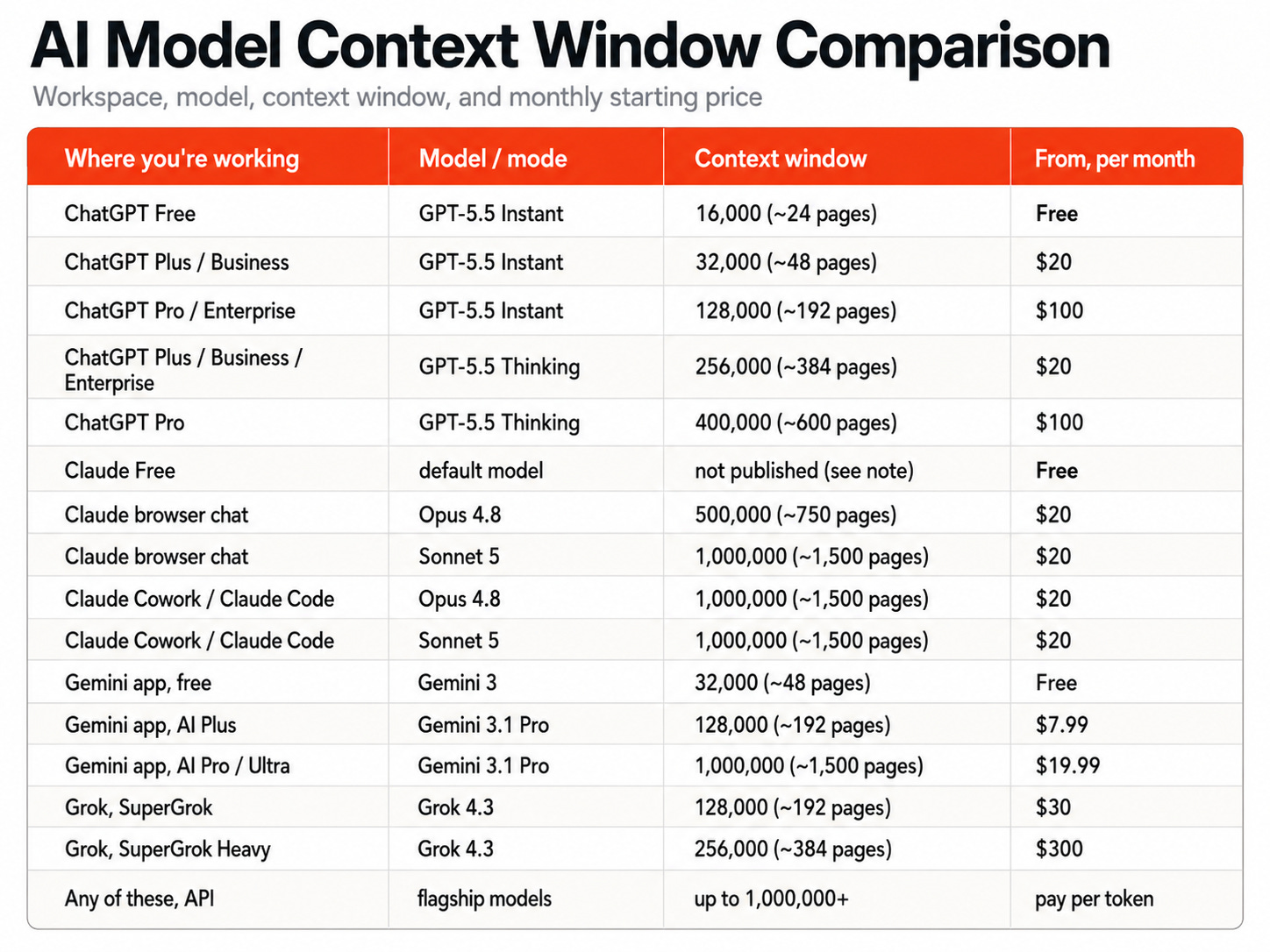
(The one figure nobody publishes is Claude Free: Anthropic doesn’t state a separate free-tier window, so free users get a standard model window but hit daily message limits well before it fills. (Grok’s app figures are reported by third parties, not published by xAI.))
Sit with the ChatGPT Free line. It has a 16,000 token window. That’s roughly 24 pages of A4 for your entire conversation, including the AI’s replies and any file you upload.
The same model family on the Pro model holds around 400,000 tokens, around 600 pages. A 25-fold difference.
Now the detail that really surprised even me, and it matters most if you work using Claude Cowork.
Claude Opus 4.8 gives you a full 1,000,000 tokens on the API, in Claude Code, and in Cowork. But open that exact same Opus in the Claude browser chat window and you’re capped at 500,000. Half the capacity, same model.
The only Claude model that gives you the full million tokens everywhere, including plain browser chat, is Sonnet 5 which launched last week, as of writing this newsletter.
And that leads to the comparison worth making if you’re deciding which tool to build your work around.
Set the developer API aside, since almost no marketer works there, and look only at the apps.
The most context you can get inside ChatGPT is around 400,000 tokens, and only on the Pro tier with Thinking mode switched on, which starts at $100 a month. Claude gives you a full 1,000,000 in its desktop app with Opus and Sonnet 5 both from the $20 Pro plan.
In the apps marketers actually use, Claude gives you roughly two and a half times the context window of the best ChatGPT can offer, from a plan that costs a fraction of the price.
That’s not a small gap. It’s the difference between holding a whole brand archive, a stack of competitor reports, or a full webinar transcript in one place, and having to chop it into pieces and hope nothing important falls off the edge.
(Use Discount Code SUBSTACKCONTEXT to get 10% off Claude for Marketers Masterclass this week only)
The Degradation Problem: What Actually Happens Inside Your Conversations and Workflows
Here’s the twist that makes all of this urgent.
The window doesn’t just fill up and forget. Quality starts slipping long before the window is anywhere near full.
Researchers have a name for the first effect: “lost in the middle.”
Models pay the most attention to the beginning and the end of a conversation, and the least to the middle. Bury an important instruction halfway through a long chat and it may as well not be there.
Then there’s what happens over a long back-and-forth. A joint Microsoft and Salesforce study ran more than 200,000 simulated conversations across fifteen leading models, and found that when information was revealed gradually across turns, rather than all at once, average accuracy dropped by around 39%.
Their blunt summary: “when LLMs take a wrong turn in a conversation, they get lost and do not recover.”
And more context is not automatically better context.
In one study, a model given around 300 focused tokens of information outperformed the same model given 113,000 tokens of the same information. Stuffing the window with everything you have can actively make the answers worse.
What about hitting 100% of your context window?
At that point the oldest tokens fall out of the window entirely, and in most apps this happens silently, no error, no banner. Whatever was at the top of the whiteboard is simply gone.
One honest caution, because I see it claimed a lot. There’s no magic percentage where quality “collapses,” no clean 60% or 70% line.
Degradation is a gradient, not a cliff, and it tracks an absolute amount of text rather than a neat fraction of your window. The practical lesson isn’t a number. It’s that quality slips earlier than you’d expect, so you should reset sooner than you think.
(Here’s a fun explainer video I created with the new NotebookLM shorts video feature. Simply gave it this article and a few instructions on what to focus on and it came up with a nice animated video which I hope helps)
The Warning Signs: How to Know You’re Hitting the Limit
Because you can’t see the window, you have to read the symptoms. These are the tells that your whiteboard is getting crowded:
• Generic output. Answers that could have come from any AI, not one that knows your brand.
• Forgotten constraints. It recommends the exact thing you told it to avoid.
• Contradictions. It disagrees with a decision it helped you make earlier in the same chat.
• Repetition. It re-suggests ideas or copy you already covered.
• Re-asking. “Could you remind me of the brand voice?” when you pasted it eight messages ago.
• Vaguer, longer, slower. Replies get wordier but less useful, and the thread starts to lag.
Here’s a simple test to diagnose it. Take the same request into a brand-new chat with just the essential context. If the quality jumps back up, it was a context problem, so start fresh. If it’s still poor, it’s a prompt problem, so refine the prompt. Most people blame the model. The cause is almost always context.
How to Protect Yourself Day to Day
You can’t see the window, so you manage it by habit rather than by gauge.
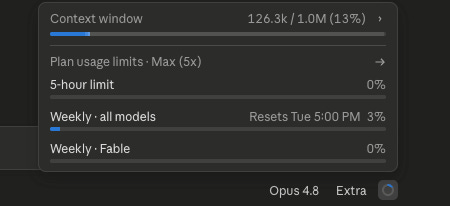
The one exception is Claude Code on the desktop, which does show you how much of your context window you’ve used. That little circle in the bottom right of the image below, when clicked on, pops up your context window usage.
Here’s 6 rules on how to protect yourself:
1. One chat, one job.
Don’t run strategy, copywriting, competitor research and email drafts through a single thread. Mixed topics create noise that makes the model worse at all of them.
This is also how I split work across tools. I do the messy front end, the ideation, the planning, the pulling together of research, in Claude chat.
Then I move the finished assets into a folder and do the end-to-end build in Cowork, where the full one million-token Opus window has room to work across all of it at once. Thinking in one place, building in another.
2. Front-load and end-load.
Put your most important instructions at the start and restate the task at the end. The model attends most to both ends, least to the middle.
3. Give it everything up front.
A single, complete brief beats drip-feeding details across turns. That one change alone closes most of the 39% accuracy gap.
4. Convert PDFs to text before uploading.
It cuts the token cost by around 80% and leaves the window free for the actual work. A simple way to do it: paste the PDF into Claude chat, ask for the clean text back, save that as a markdown file, and use the lightweight markdown version in Cowork instead of the heavy original.
5. Reset with a summary.
After roughly fifteen to twenty exchanges, or the moment quality dips, ask the AI to summarise the key decisions, constraints and next steps, then paste that into a fresh chat. You keep the substance and drop the dead weight.
6. Store standing context in a Project.
Your brand voice, audience and rules belong in a Claude or ChatGPT Project, not re-pasted into every chat where they can scroll off the top.
Choosing The Right Model: Five Marketing Workflows
This is where it gets practical.
Model choice isn’t really about which one is “smartest.” It’s about matching the window to the job in front of you. Here’s how that plays out across the work marketers actually do.
1. Research, then content creation.
You’re building a long-form piece from a research brief, your brand guidelines and a couple of source documents, then drafting from all of it. You need everything visible at once. On a 16K or 32K window it runs out partway through and your early style guidance quietly drops off. This is a job for a big-window surface: Claude Sonnet 5, Cowork with Opus, Gemini on AI Pro, or the current GPT flagship. Give it the source material first, your question last.
2. Prospecting and competitor research.
You’re dropping in multiple competitor reports, landing pages and market research to find the gaps. This is the most window-hungry task there is, because each document is thousands of tokens and you want them all in view together. At 32K you’re comparing two or three at a time and deciding on partial evidence. At a million on Opus you can hold the whole set at once. Or maybe use Perplexity, which retrieves and cites live sources instead of making you paste everything in.
3. Cold email sequences.
A ten-email sequence built from your ICP, a messaging playbook and a few winning past emails is easily 20,000 to 40,000 tokens once it’s all loaded. Comfortable on most paid models. But run it as one long thread and by email seven the voice has drifted, because your original playbook is fading off the top of the board. Better: keep the playbook in a Cowork Project so it never scrolls away.
4. Working with spreadsheets.
A CSV export is deceptively heavy. A thousand-row spreadsheet can run anywhere from 50,000 to 150,000 tokens depending on how text-heavy it is, enough to blow a small window on its own before you’ve asked a single question. For real data work, reach for a genuine large-window model, and if the file is huge, feed it in chunks and ask it to quote the rows it’s using so you can catch any drift.
5. PowerPoint and long documents.
Analysing a full annual report (around 112,000 tokens on its own) or a large deck simply won’t fit inside a ChatGPT Plus window. Trying anyway means silent truncation and confident, wrong answers. This is Sonnet 5, Gemini or Cowork Opus territory.
The pattern underneath all five: small, one-off jobs work fine on anything, so don’t overthink those. But the moment you’re holding a lot of material at once, or working across a long session, the window becomes the deciding factor in whether the output is any good.
The Payoff: What You Get When You Understand Context Windows
Learning one invisible concept can sound abstract, so here’s what actually changes.
You stop losing your brief. The most common failure in AI marketing work, the brand guidelines you pasted in message one being ignored by message twelve, simply stops happening once you manage context deliberately.
You stop blaming the model. “The AI was brilliant last week and rubbish today” is nearly always a context issue. Diagnosing it correctly means you fix it in seconds instead of fighting the tool.
You get better output, for less. Leaner, more focused conversations don’t just cost fewer tokens and run faster, they produce sharper answers, because you’re not drowning the signal in noise.
You make better model choices. Knowing that a Plus user has around 32K to play with, not a million, changes how you structure a task before you even start, and tells you when to trust a long session and when to reset.
The Honest Caveats
A few things worth naming plainly.
The numbers move monthly. Context windows and model names change constantly. The figures here are current as I write, but check the model you’re actually using rather than trusting any table for long.
Memory softens this, but doesn’t remove it. Every major tool now has memory features that carry facts across chats. That helps between conversations. Inside a single long chat, the window limit still bites exactly as described.
There’s no perfect gauge. The “effective working window” rules of thumb, like staying in the first quarter or so of the window for important work, are sensible habits, not guarantees. Treat them as a nudge to reset, not a precise science.
The Bigger Picture
For most of the last two years, we obsessed over prompts, the perfect wording to squeeze a good answer out of a blank-slate AI.
The skill that actually separates strong AI marketers now is quieter than that. It’s managing context: what’s in the window, what’s fallen out, and when to start again.
Understanding the context window is what turns AI from a slot machine, sometimes brilliant, sometimes baffling, with no idea why, into a tool you can actually direct.
The marketers who struggle treat the chat box as infinite and wonder why it lets them down. The marketers who win know the whiteboard is finite. They can sense it filling even when the screen won’t show them, and they clear it before it clears itself.
You stop hoping the AI remembers. You start managing what it can see.
This week’s challenge: next time you’re deep in a long AI session and you feel the quality slipping, don’t push on and don’t re-paste your brief. Instead, ask the AI to summarise the key decisions, constraints and next steps so far, open a fresh chat, and paste that summary in as your starting point. Notice how much sharper the next answer is. Reply and tell me what you were working on, I’d love to know if it made the difference.
Thanks for reading Marketing with AI. If you found this useful, sharing it with one other marketer is the best compliment I could receive.
Need 1:1 Help to Embed Claude into Your Marketing?
I work with organisations to automate tasks, streamline workflows, and get more done with AI - building the skills, systems and workflows that turn Claude into their marketing operating system. Consulting, coaching and training, in person or on demand.
From 0.5 days overviews to 2-day workshops, I can help you automate more marketing work and streamline your workflows to get mroe done with AI. I offer both in-person and online sessions to suit your needs.
Want a behind the scenes look at Claude for Marketers Online Masterclass?
Remember, you get lifetime access, along with full course updates and new modules being added until the end of 2026. New modules coming soon include Claude Code, Claude Design and How to Build an AI Marketing Team.
Substack Newsletter readers get 10% off this week only with code SUBSTACKCONTEXT