

The Marketer's Guide to Working With GitHub
It sounds like a developer's tool. It's actually the shared home for your marketing team's AI skills, playbooks and documents. This is how you collaborate as a marketing team using AI in 2026.
Every Wednesday, one essay on what's actually working in Marketing with AI - tools, workflows, and mindset shifts you can apply immediately.
Apologies for being a little quieter the last few weeks with the Marketing with AI newsletter.
That’s because I’ve spent the last two months running Claude for Marketers workshops with marketing teams from the US to the UK and even South Africa - and building the Claude for Marketers Online Masterclass.
And the same conversation came up in every room: marketers don’t need another AI course to half-finish. You’ve watched the videos, saved the prompts, bookmarked the threads - and you’re still doing your marketing the slow way.
So I didn’t build a course…

The Claude for Marketers Masterclass is a step-by-step instruction manual for turning Claude into your always-on marketing team - so the AI does the work, in your voice, for your business.
Substack Newsletter readers get 20% off this week with code SUBSTACKJUNE20
But if you want to learn a little bit more first click here → [learn more]
I’ve also included a video at the bottom of this page with a ‘Behind The Scenes’ look inside the masterclass if that helps.
Anyway, with that being said, it’s great to be back.
I hope you enjoy this weeks newsletter.

Say the word “GitHub” in a marketing meeting and watch what happens.
Eyes glaze. Someone mentions developers. Someone else quietly decides it is not for them.
The name does most of the damage.
“Git” sounds technical. “Hub” sounds like plumbing.
And the moment you open it up, you are met with words that belong to someone else’s world: repositories, commits, branches, pull requests, forks.
It reads like a foreign language written by engineers, for engineers.
So most marketers do the reasonable thing. They assume it is a coding tool, file it under “not my job,” and move on.
In this article, I want to make the case that this is one of the most expensive assumptions in marketing right now. Not because every marketer needs to learn to code. They do not.
But because underneath the off-putting terminology, GitHub is something almost every marketing team already needs and most are quietly paying the price for not having.
And this is especially true now that your team has started building things with AI.
So let me strip away the jargon, show you what GitHub actually is in language that makes sense to a marketer, and walk you through exactly how to use it as the shared home for your team’s Claude skills, prompts, and playbooks.
Start With the Problem, Not the Tool
Forget GitHub for a moment.
Let me describe a situation you will recognise as a marketer.
Your team has started building a library of Claude prompts and skills. The person who leads on AI puts together a set of brand-voice skills and workflow prompts and shares the folder on OneDrive. Three people download them and start using them.
One tweaks the email skill and saves it to their desktop. Another improves the social prompt and uploads it back, but to a slightly different folder, with a slightly different name. Nobody tells the fourth person anything has changed.
Six months later, half the team is running prompts from before your last brand refresh. The other half is on a newer version, but nobody is quite sure if it is the final one. A freelancer is working from a file someone emailed in spring. When a new starter joins and asks where the “real” versions live, the honest answer is that nobody knows.
This is a version control problem, and marketers have never had a proper tool for it.
We feel it everywhere…
Brand guidelines that exist as a PDF someone emailed two years ago.
Campaign templates scattered across personal drives.
The “final” deck saved as final_v3_ACTUAL_final_use_this_one. (this does make me laugh, not going to lie)
The genuine cost is not just the irritation.
It is brand inconsistency from people using outdated assets, hours lost hunting for the current file, work recreated because nobody could find the original, and the real risk of publishing something off-brand or non-compliant because the wrong version went out.
Developers hit this exact wall years ago.
Multiple people editing the same files, overwriting each other, ending up with four competing copies and no official one. They built a solution, gave it an intimidating name, and largely kept it to themselves.
That solution is version control, and the most popular home for it is GitHub.
So What Is GitHub, Really?
Here is the short history, because the background helps it make sense.
GitHub launched in 2008 and was acquired by Microsoft in 2018 for $7.5 billion. It now hosts hundreds of millions of projects and is used by well over a hundred million people.
The technology underneath it is called Git, a version control system originally created by the people behind Linux.
The simplest way to hold the difference in your head:
Git is the engine, GitHub is the specific place that engine lives online so a team can share it.
You no more need to understand Git to use GitHub than you need to understand a combustion engine to drive a car.
Developers adopted it first because they felt the pain first. But nothing about version control is specific to code.
The same mechanics work just as well for marketing documents, templates, brand guidelines, AI prompts, and Claude skills.
Strip away the terminology and GitHub is three things you already understand.
1/ It is a folder in the cloud.
A “repository,” or repo, is just a project folder that lives online.
Files and sub-folders, the lot. If you can picture a shared Dropbox or OneDrive folder, you can picture a repo.
2/ It’s Track Changes, for everything.
Microsoft Word has Track Changes for a single document.
GitHub has it for an entire folder of files, with a permanent record of who changed what, when, and why, and a one-click way to go back to any earlier version. Nothing is ever truly lost or overwritten.
3/ It is a shared workspace with rules.
You decide who can see it, who can edit it, and who can only read it.
Updates flow from one person to the whole team in a deliberate, controlled way, not by attaching a file to an email and hoping everyone opens the right one.
If it helps, here is the developer language translated into terms that actually mean something to a marketer.
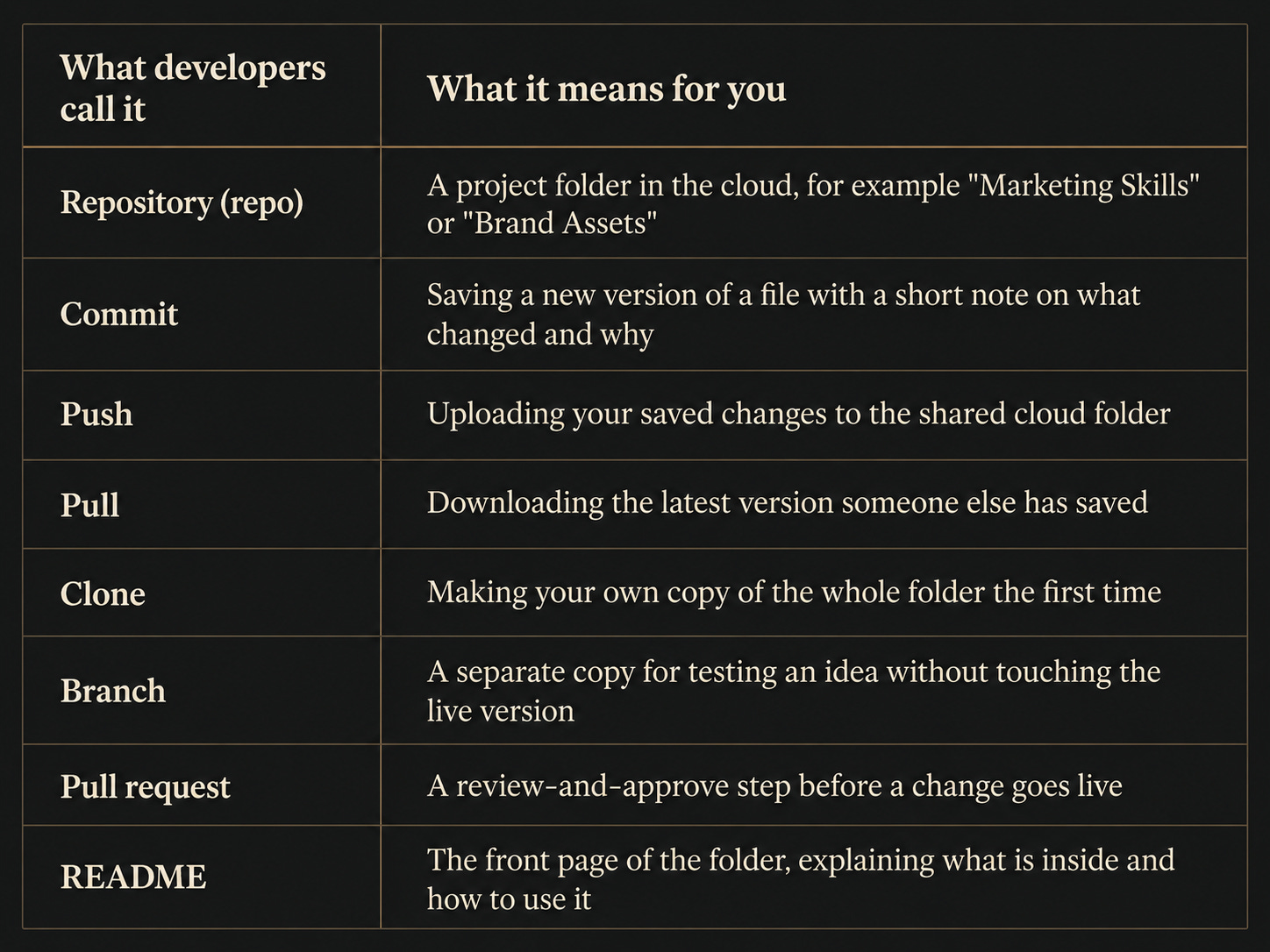
The reframe to hold onto: GitHub is not a coding tool. It is a version-controlled shared folder. The fact that developers use it for code is not relevant to marketers use cases.
Why GitHub Suddenly Matters for Marketers
Marketing teams have always had messy folders. But we coped.
So why does this problem matter more now than it did three years ago?
Because you have started producing a completely new kind of asset: Claude skills, plugins, prompts, and the playbooks behind them.
These are not one-off documents you write once and file away. They are living instructions your team runs again and again.
A cold-email skill.
A brand-voice skill.
A campaign-brief template.
These are the kind of specialist skills I wrote about in The Marketer’s Guide to Building an AI Marketing Team, where I showed how a team of skills can take a single brief and produce a full campaign.
That article answered the question of what you build.
(And I’ll be showing you how to do this yourself inside a future module of the Claude for Marketers Online Masterclass if this is something you want to learn how to do for yourself or your marketing team.)
But it left a quieter question open.
If one person builds the system, how does everyone else actually use it, and stay in sync as it improves?
This article is my answer to that question.
AI assets are exactly the kind of thing version control was built for, because they have three awkward properties.
They get updated constantly. You refine a skill every time the output is not quite right, and a good skill might change a dozen times in its first month.
The whole team needs the same one. If three people are running three slightly different versions of the brand-voice skill, your brand voice is no longer consistent. It just feels consistent to each person individually.
A bad change needs undoing fast. If an update makes a skill produce weaker copy, you want to roll back in seconds, not rebuild it from memory.
OneDrive cannot really do any of this.
It syncs files, but it does not give you a clean history, a deliberate “this is now live for the team” moment, or a sensible way to revert.
GitHub was built for precisely this, and marketers have noticed.
A 2026 analysis of thousands of prompt repositories on GitHub found that marketing was the single most common domain for AI prompts stored there, with campaign strategy, market research, and email marketing among the most popular categories. We are already doing this. Most of us just have not realised it yet.
The promise of GitHub is simple.
Your team’s AI skills live in one place. One person pushes an update. Everyone else pulls it.
There is one current version, ever, with a full history behind it. That is the difference between a shared folder that slowly rots and a system that stays alive.
How GitHub Actually Works, End to End
Let me walk through the full loop, from building a skill to a teammate using it, because seeing the whole journey is what makes it click.
First, a quick reminder of what a Claude skill actually is, because it is far less intimidating than it sounds.
A skill is just a folder with a plain-text file inside it called SKILL.md. That file holds a name, a short description, and a set of instructions written in plain English.
Anthropic describes skills as folders of instructions and resources that teach Claude how to complete a specific task in a repeatable way. I describe it as a way to capture your repeatable processes.
The important point for a marketer is this: a skill is a markdown file in a folder, which means a repository full of skills is just a folder full of folders of text files.
Nothing in there will frighten you.
Here is the cycle.
One, build the skill. You describe what good looks like, your best cold email, your campaign-brief format, your brand voice, and Claude writes the SKILL.md for you. This is the same describe-it-and-Claude-builds-it process from the AI marketing team article.
Two, put it in your repository. The skill folder goes into your shared team repo, organised by category. This repo is now your single source of truth.
Three, push the update. When you save and push, the new or improved skill is live in the cloud copy of the repo.
Four, the team pulls it. Each teammate refreshes from the repo and instantly has the latest version of every skill. You did not email anyone. You did not attach anything.
Five, improve and repeat. When you refine a skill, you push again, the team pulls again, and the whole system stays current by design rather than by nagging.
If you want to see this pattern in the wild, Anthropic runs a public example that maps onto a marketing team almost perfectly.
It is a repository called knowledge-work-plugins, and it is organised into role-based folders: marketing, sales, finance, legal, human resources, product management, data, customer support.
Open the marketing folder and you find skills for drafting content, planning campaigns, enforcing brand voice, briefing on competitors, and reporting on performance.
It is, in effect, Anthropic’s own version of the seven departments I described in the AI marketing team piece, all sitting in one shared GitHub repository.
The README puts it plainly: every component is file-based, just markdown and JSON, with no code, no infrastructure, and no build steps. That is the exact structure you can copy for your own team.
(Don’t be put of with JSON and markdown - Claude can help build all of this in plain English)
For the people pulling those skills, there are two friendly routes and neither requires an intimidating code terminal.
Inside Claude, your teammate can add your repository once as a skills source, then the skills simply appear and stay updated. It’s as simple as that.
When you push an improvement, everyone refreshes and they are current again. One update at the source. One refresh at every marketers desk.
And because every change is a commit with a note and a timestamp, your team gets, for free, an answer to the three questions that haunt every shared drive.
Who changed this? When? Can we go back to how it was last Tuesday?
With GitHub, the answer to that last one is always yes.
How to Set It Up, Step by Step
The good news first: a small marketing team can do all of this for free, and the first setup takes about fifteen minutes.
After that, the daily reality is two clicks. Save your change, push.
Here is the path I would recommend for a non-technical team.
1/ Create a free GitHub account. Go to github.com, sign up, and confirm your email. The free plan is genuinely enough to start.
2/ Create your first repository. Click New, give it a clear name like marketing-skills, and set it to Private so only invited people can see it. Add a short description and a README.
3/ Decide your folder structure before you fill it. Mirror your departments: a folder for content, one for SEO, one for brand-voice, one for campaign templates. Your whole team will rely on this structure, so it is worth ten quiet minutes.
4/ Install GitHub Desktop. This is the part that removes the fear. GitHub Desktop is a free app that lets you do everything through buttons instead of typed commands.
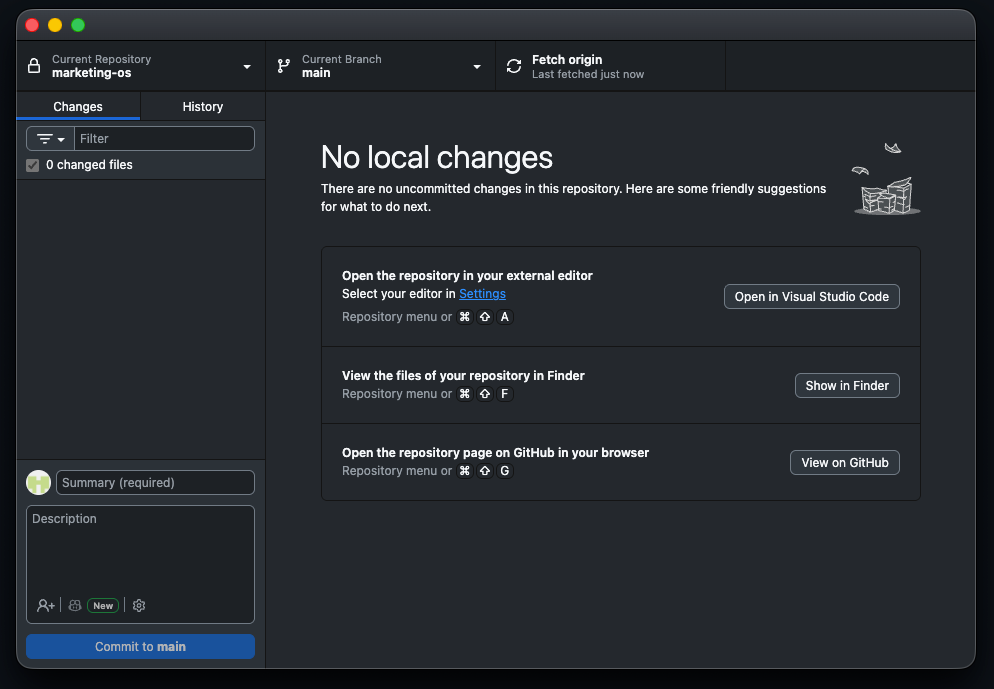
GitHub’s own description is that it lets you commit and push changes through a visual interface rather than the command line. You clone your repo to your computer once, and from then on it behaves like a normal folder that syncs to the cloud when you push.
5/ Add your first skill and push it. Drop a skill folder in or a prompt you want the team to use at all times, then write a one-line note such as “Add cold-email skill,” and click Push. It is now live for the team.
6/ Invite your team. In the repository settings, go to Collaborators, and invite people by their GitHub username or email. They accept, and they are in.
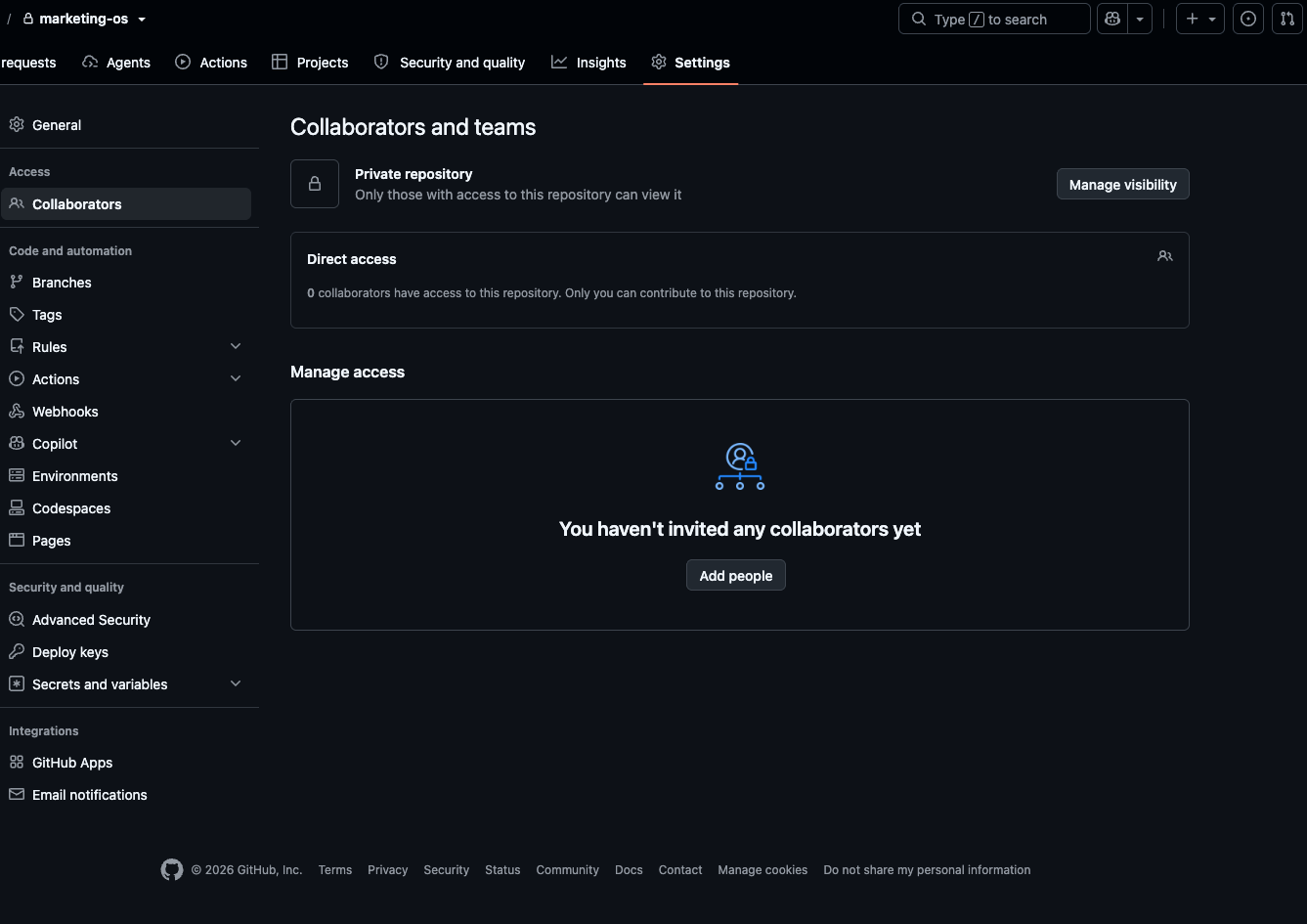
7/ Set permissions so everyone has the right level of access. This is simpler than it sounds, and it is worth getting right.
For a small team, a private repository with collaborators is all you need.
There are two roles: the owner, which is you, with full control, and collaborators, who can read and edit. You invite people one at a time, and you can remove them just as easily.
For a larger or more structured team, you create a GitHub Organisation, which lets you manage many people and repositories together and group people into named teams.
Within an Organisation you can grant tiered repository roles, which is how you give a freelancer read-only access while your core team can edit.
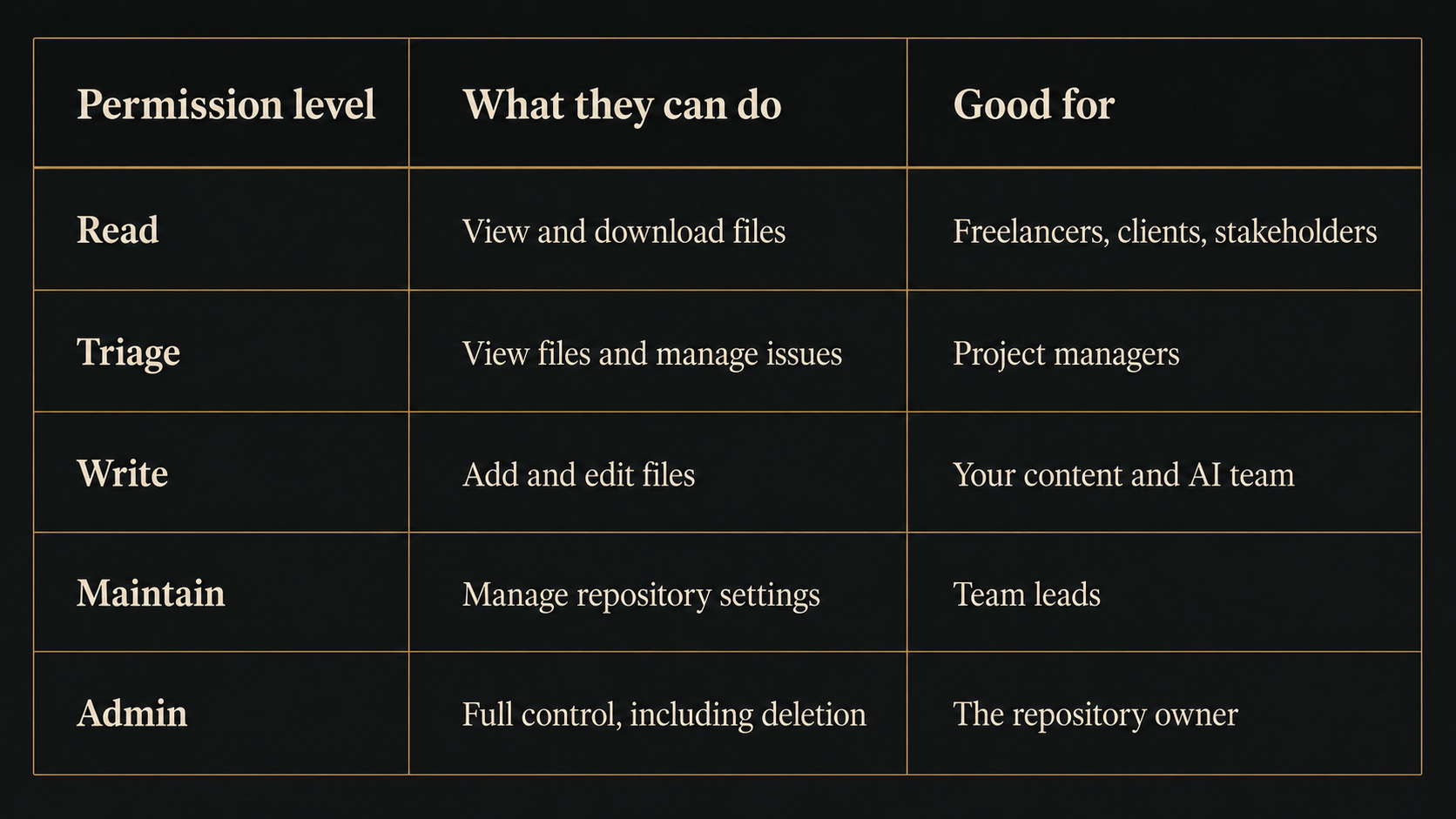
The rule of thumb: start with a private repo and a handful of collaborators. Move to an Organisation only when you have enough people or repos that you genuinely want named teams and tiered permissions.
Just don’t over-engineer on day one.
When it comes to cost, free is where most readers will start and stay.
The free plan gives you unlimited private repositories and, importantly, unlimited collaborators on them.
When you outgrow it, GitHub Team adds proper team controls and approval workflows for roughly four dollars per user per month, and GitHub Enterprise adds single sign-on and advanced security for around twenty-one dollars per user per month, which is almost certainly more than a marketing team needs.
Prices do change, so check the current figure on GitHub’s pricing page, but the headline stays the same: you can run your whole team’s skills library without spending anything.
What Benefits You Actually Get From GitHub
When a marketing team is using AI, the benefits of GitHub compound.
Here is what changes and the real, tangible benefits you and your marketing team will see:
1/ One source of truth, permanently.
Every skill, template, and playbook lives in one place, with one current version and a full history behind it. The “which file is final” problem disappears.
2/ Consistent brand voice across AI outputs.
When the brand-voice skill everyone runs comes from the same repo, your brand voice is genuinely consistent, not consistent only in theory.
3/ Updates that reach everyone instantly.
You improve a skill, push it, and the team pulls it in seconds. Compare that to emailing a revised PDF and hoping people read it.
4/ Rollback when something goes wrong.
If a change makes a skill produce weaker copy, you can see exactly what changed, compare versions, and revert in one click. Teams running live AI work treat fast rollback as non-negotiable, and this gives it to you.
5/ A way to test prompts like you test campaigns.
GitHub’s branching model lets you keep proven prompts in your main version while testing a new approach on the side. When the new one wins on a real metric, it becomes the standard. Your prompt library turns into a record of what actually works.
6/ Onboarding in minutes, not weeks.
A new starter clones one repository and instantly has every approved skill, template, and guideline the team has ever built. The week of document hunting goes away.
7/ A full audit trail.
Every change is attributed to a person, with a timestamp and a reason. If something off-brand ships, the history tells you exactly where it came from.
The line to remember: GitHub turns your AI skills from a personal collection into shared team infrastructure. That is the jump from “I have some useful prompts” to “we run a marketing system.”
Where to Start With GitHub for Marketing: Four Real-Life Use Cases
You don’t need to do everything at once. Pick one of these and you will feel the value within a week. And at the same time, once you understand the mechanics, working with GitHub is pretty easy.
1/ The shared Claude skills library.
This is the highest-value first move. Create one private repo called marketing-skills, put your three or four most-used skills in it, organised by folder, and invite your team. Everyone installs them once and runs the same versions. When you improve a skill, everyone gets the improvement.
2/ Brand guidelines as a living document.
Move your brand guidelines out of that ageing PDF and into the repo as simple, readable files. When the brand evolves, you update once and push. Freelancers get read-only access and are always working from the current version, never last year’s.
3/ Campaign templates and process docs.
Your product-launch checklist, your nurture-sequence structure, your content calendar, your approval workflow. Every new campaign starts from the current, version-controlled template, and when a post-mortem improves the process, that improvement is instantly there for the next campaign.
4/ Agency and client collaboration with controlled access.
If you run work for multiple clients, give each client a separate repo with read-only access to their own assets, and keep your internal skills in a private repo only your team can edit. Clients always see the current version, with a clear history, and nobody sees anyone else’s work.
A quick scene to make it concrete…
On Monday morning I improved our cold-email skill so it’s now able to review a prospect’s recent activity before drafting. I pushed the change at nine to the team skills repository.
By the time the team logged on, everyone’s cold-email skill had already updated. No message from me, no “please use the new version,” no version confusion. One push, the whole team current.
That is the day-to-day reality of running skills on GitHub, and it is the thing OneDrive cannot replicate - even with cloud syncing.
An Honest Word on GitHub
I would not be doing my job here if I pretended this was effortless, so here are the real caveats.
There is a small learning curve on day one. The words are unfamiliar at first, but you learn commit, push, and pull once, and GitHub Desktop plus Claude removes most of the friction after that.
It is overkill for a true solo operator who never shares anything. If it is only ever you, a well-organised local folder may be enough. GitHub earns its place the moment a second person is involved, or the moment you want a real history and the ability to roll back.
It is deliberate, not automatic. Unlike OneDrive, GitHub does not sync in the background. You push when you mean to publish. For skills, that is a feature, because you control exactly when the team gets an update, but it is a genuine shift in habit.
And one firm rule: do not put sensitive material in a shared repo. No passwords, no API keys, no customer data. Keep it to skills, prompts, templates, and guidelines, which is what it is for.
The Bigger Picture
For a long time, version control was a developer’s luxury that marketers never got to share.
That has flipped.
The moment your team started building AI skills, you started producing the exact kind of living, frequently-updated, must-be-consistent asset that version control was invented to manage.
GitHub gives a marketing team a single, always-current source of truth, a complete history of every change, instant updates for everyone, one-click rollback when something breaks, and the infrastructure to treat your AI prompts like the marketing assets they have become: tested, versioned, and improved over time.
Building the AI marketing team was the last article.
Giving it a shared home is this one.
This week’s challenge: create one free, private repository called marketing-skills. Put your single most-used Claude skill or prompt inside it. Install GitHub Desktop, invite one teammate, and have them pull it. The moment they pull your update and run it is the moment the value stops being theoretical. Reply and tell me what you put in first. I would love to know what your team starts with.
Need 1:1 Help to Build Your Own GitHub Marketing Team Repo?
If you want to work through this hands-on, I run 1:1 Claude Marketing Power Hours and work with teams embedding this kind of system from first steps to full-scale deployment.
Want a behind the scenes look at Claude for Marketers Online Masterclass?
Remember, you get lifetime access, along with full course updates and new modules being added until the end of 2026. New modules coming soon include Claude Code, Claude Design and How to Build an AI Marketing Team.
Remember, Substack Newsletter readers get 20% off this week only with code SUBSTACKJUNE20